Realsoft Graphics Oy |
Tab
|
|
|---|---|---|
 |
Windows | 
|
Realsoft Graphics Oy |
Tab
|
|
|---|---|---|
|
|
Windows |
|
 |
The tab gadget has one or more labeled tabs. Selecting a tab opens a different page. Other gadgets can be drag&dropped to the tab pages. Only one page at a time is visible. |
|
The tab gadget has the following options: Labels - Shows the labels that are to be created in the tab control. Add - Add another label. |
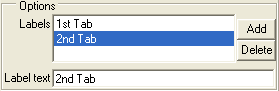 |
Delete - Delete the selected label. Select the label in the Labels gadget.
Label text - Change the selected label. Select the label in the Labels gadget.
|
|
 |
|
| Cycle |  |
Frame |


