Realsoft Graphics Oy |
File Instance
|
|
|---|---|---|
 |
Geometric Primitives | 
|
Realsoft Graphics Oy |
File Instance
|
|
|---|---|---|
|
|
Geometric Primitives |
|
The File Instance object instances specified Realsoft 3D project file (.r3d). A file instance object can be transformed or animated similar to any regular geometric object. However, it cannot be single point edited or morphed.
File instancing often saves memory and speeds up real time rendering when building complex scenes. Another important application is related to project management. Several users can edit and improve components of the same scene. The results are automatically combined via file instancing.
The attributes of the file instance object are as follows:
File - The name of the .r3d file to be instanced
Geometrics - Load in geometric objects from the file
Load Geometry - Load in geometry for accurate real time rendering
Materials - Load in material objects
Effects - Load in particle post effects
Render as instance - Activates instancing in photorealistic rendering.
|
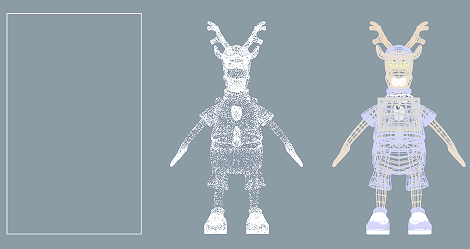
If the Load Geometry option is set, the full geometry is loaded and kept in memory for real time rendering purposes. In this case, a file instance will not offer any memory saving compared to using a regular object. If Load Geometry is disabled, only a simpler visualization is available. This often saves memory and speeds up real time rendering. |
 |
The alternatives for simpler visualization are:
If Wire Density is 1, the object is drawn as a simple wireframe bounding box.
If Wire Density is greater than 1, the object is drawn as a point cloud. The Wire tab's Curve Quality and Wire Density controls together define the density of the point cloud.
![[Note]](../../../../../gfx/note.gif) |
Note |
|---|---|
| File Instancing resolves material and particle effect references primarily inside the instanced file. For example, if the user has created a wooden chair and adds a file instance of it into a new project, the wood material is first searched from the instanced file. If it is not found, then the wood is searched from the actual material library of the project. |
If the Render as instance option is set, the render engine does not convert all file instances of the same target file to real objects but performs the instancing transformation during ray tracing. Only the first file instance is stored in memory; other items will transform the same geometry data. This typically slows down rendering by 20%-30%, but saves memory. For example, it is possible to model and render a forest by repeating thousands of instances of a dozen of basic tree shapes.
Applying render time instancing to simple basic shapes does not save memory, but actually can increase the memory use, because the transformation matrices require also some memory space.
|
Note |
|---|---|
| Render time instancing has some limitations. Currently render time instancing does not allow nested or scaled instances. Only translation and rotation are allowed. The program automatically disables render time instancing if these conditions are not set. Secondly, the applied geometric transformation may confuse complex VSL shaders which refer to 3D coordinate information. |
|
|
 |
|
| Field Evaluator |  |
Font |


