Realsoft Graphics Oy |
Realsoft 3D
|
|
|---|---|---|
 |
Output Objects | 
|
Realsoft Graphics Oy |
Realsoft 3D
|
|
|---|---|---|
|
|
Output Objects |
|
This is the native file format of Realsoft 3D. It supports arbitrary amount of channels, and each sub channel can use any of the standard data types from a single BYTE up to 64 bit IEEE floating point format. This format implements practically unlimited data bandwith. It is especially suitable for storing intermediate deep images which will be post processed later in high quality. The controls are:
|
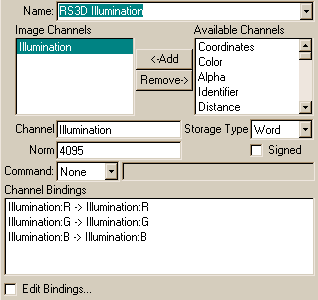 |
Norm: Defines a conversion factor from floating point to integer form. The smaller the value, the wider value range the channel can store but with smaller precision. See the notes below.
Signed: Enables/disables negative values for the channel.
Add: Adds the selected channel from the system channels into the image format.
Remove: Removes the selected image channel.
![[Note]](../../../../gfx/note.gif) |
Note |
|---|---|
| For integer based data types (8 bit BYTE, 16 bit WORD, 32 bit INTEGER), the user can also define how floating point values are converted to the fixed point number form. The Norm value defines the conversion factor: integer value = float value*norm value. For example, for an usual byte based color channel, a suitable norm value is 255. Because this is also the largest value which 8 bits can represent, such a byte channel can only store float values between 0 - 1. Value -0.5 will be truncated to zero and 1.5 to 1. This is perfectly OK for the image color, but unsuitable for e.g. XYZ components of a surface normal vector. |
Another related control is the Signed option. Turning it on makes it possible to store negative values to the channel. Channels themselves define convenenient defaults for datatype management. Therefore, changing the Norm and Signed controls is seldom necessary.
Some examples:
The default norm value of a word based color channel is 4095. Because the largest value which a 16 bit unsigned word can store is 65535, the maximal signal which you can store to the channel is 65535/4095 = 16. In other words, this kind of channel chan store 16 times brighter values as the standard white signal (1,1,1). It is also 4095/255 = 16 times more accurate as a byte channel. Summary: of the extra 8 bits of a word compared to a byte, 4 bits are used for the higher precision and 4 bits for the wider value range.
If you wish to use a word channel to store the Z (distance) buffer and you know that the scene diameter is 100 meters, set the norm value to 65535/100 = 655. Then you do not need to rescale distance values at rendering time to prevent data overflows.
The suitable byte options for storing a surface normal are: Signed enabled, Norm value=127. X, Y and Z components of an unit vector run from -1.0 to 1.0, so the value range available must be split between negative and positive values. For example, you can store the bump normal needed for Global Illumination processing to a byte channel without noticeable loss of quality and save lots of memory.
|
|
 |
|
| PPM |  |
Targa |


