Realsoft Graphics Oy |
Input
|
|
|---|---|---|
 |
Choreography Window | 
|
Realsoft Graphics Oy |
Input
|
|
|---|---|---|
|
|
Choreography Window |
|
The Input tab controls choreography parameterization. By default, choreographs are parameterized by the usual animation time, but here you can set up other kind of dependencies as well. For example, thickness of a muscle can depend on a skeleton angle.
|
The input parameter can be changed as follows: By selecting an object from the select window, then choosing the corresponding object type from the selector in the 'Input' area and pressing the 'Change' button. After that, the choreography window displays the attributes of the chosen object and you can activate a suitable parameter for the choreography. For example: |
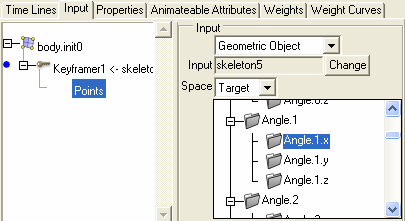 |
Animate the desired property (for example, the scale of a muscle).
Go to the Input tab of the choreography window. Select the keyframer object which animates the property.
In the select window, select the object, which should control the animated property. It can be another geometry object, a material etc.
In the choreography winsdow, set the input object type gadget to match the object selection you did. If you selected a material, set Input=Material here, too.
Hit the Change button.
Select a suitable attribute from the displayed attribute list.
To summarize, the input control gadgets are:
|
|
 |
|
| Time Lines |  |
Properties |


